

Scan for
interactive poster
Modular, Reproducible Data Workflows for Science
An Open-Source Python Framework by NOAA Global Systems Laboratory

The Challenge
Environmental and scientific workflows span heterogeneous data sources — HTTP FTP S3 APIs — and diverse formats such as GRIB2 NetCDF GeoTIFF. They require repeatable transformation chains and produce outputs ranging from static maps and animations to interactive pages and publishable datasets. Existing approaches often rely on ad-hoc scripts that break when data changes and lack reproducibility across teams and environments.
Zyra (pronounced Zy-rah) provides a lightweight, CLI-first framework that standardizes these common steps while remaining fully extensible for domain-specific logic. Think of it as a garden for your data: you plant seeds (from the web, satellites, or experiments), Zyra helps you nurture them (through filtering, analysis, and processing), and you harvest insights as visualizations, reports, and interactive media. It's designed to make science not just rigorous, but also accessible, transparent, and beautiful.
The Pipeline: 8 Composable Stages
Use only what you need. Each stage streams via stdin/stdout for Unix-style chaining.
zyra search (SOS catalog, OGC, remote APIs), then fetch from S3, FTP, REST, or HTTP with automatic retry and checksum validation.via HTTP, S3, or FTP and transform.
produce automated scientific summaries and reports.
disseminating to cloud or local storage.
| # | Stage | Purpose | CLI | Status |
|---|---|---|---|---|
| 1 | Import | Search & fetch from HTTP/S, S3, FTP, REST API | zyra acquire | Implemented |
| 2 | Process | Decode, subset, convert (GRIB2, NetCDF, GeoTIFF) | zyra process | Implemented |
| 3 | Simulate | Generate synthetic/test data | — | Planned |
| 4 | Decide | Parameter optimization and selection | — | Planned |
| 5 | Visualize | Static maps, plots, animations, interactive | zyra visualize | Implemented |
| 6 | Narrate | AI-driven captions, summaries, reports | zyra narrate | Implemented |
| 7 | Verify | Quality checks and metadata validation | zyra verify | Partial |
| 8 | Export | Push to S3, FTP, Vimeo, local, HTTP POST | zyra export | Implemented |
Stages are composable — pipe any stage's output directly into the next. Every stage supports stdin/stdout for seamless chaining.
HRRR Wind Analysis: GRIB2 to Interactive Map
Fetch only the variables you need from a 300 MB GRIB2 file using the .idx byte-range trick, convert to NetCDF, and render an interactive wind-streamline map — four commands, one pipeline.
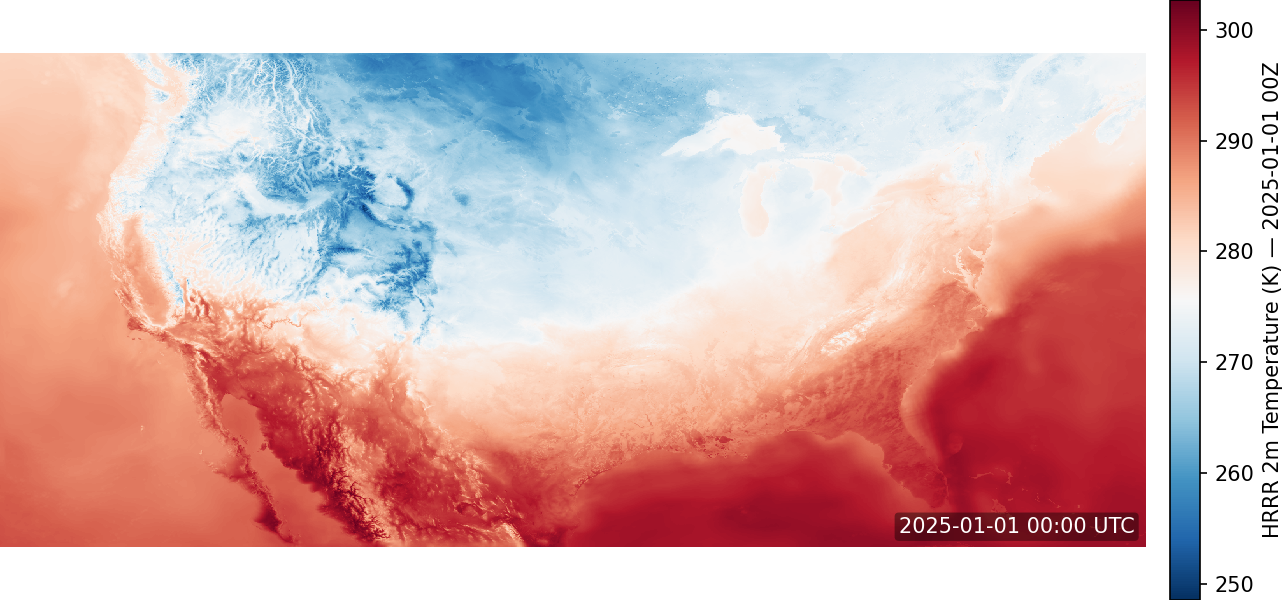
2m Temperature — zyra visualize heatmap
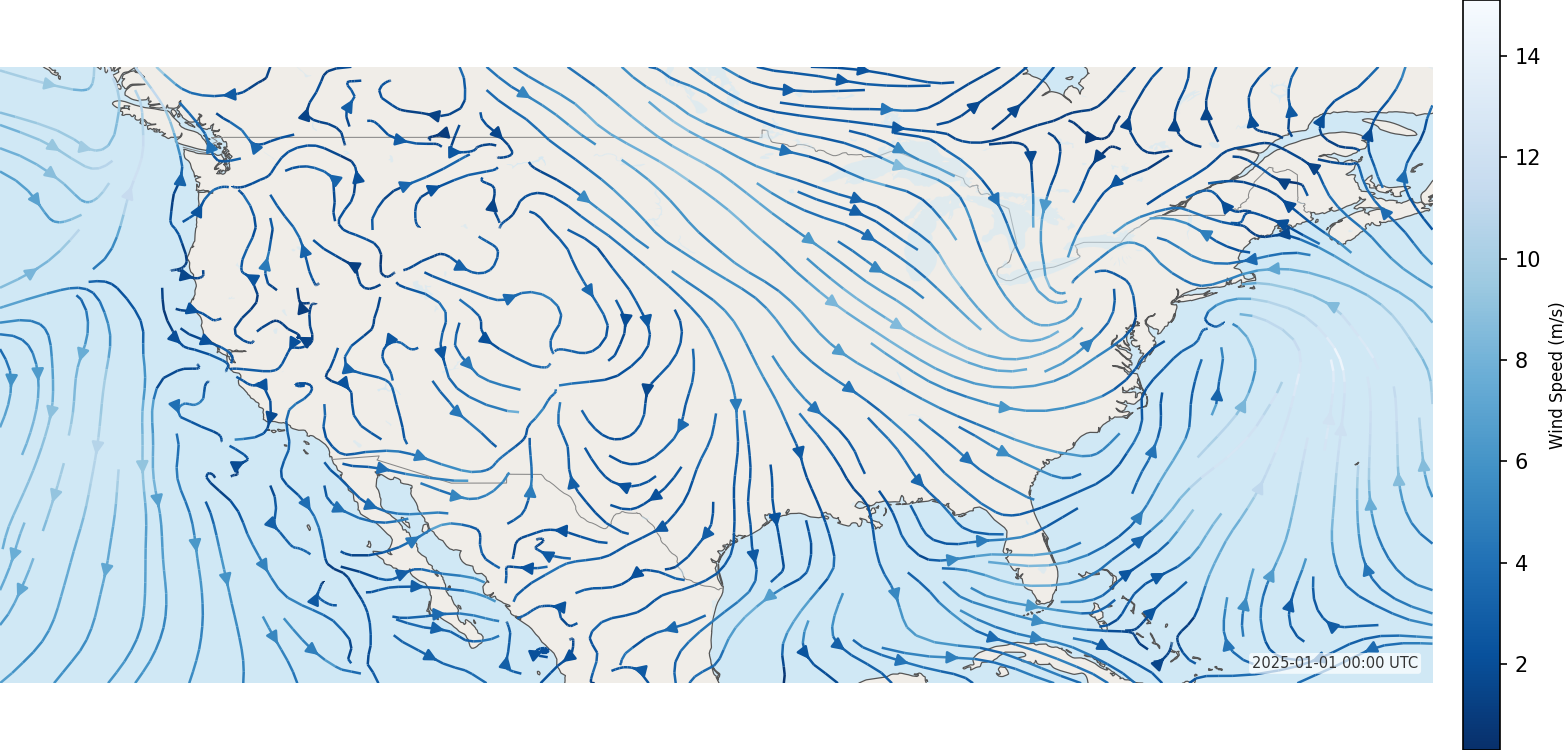
10m Wind Streamlines — zyra visualize vector
Drought Animation Pipeline
Discover datasets via SOS catalog, sync weekly drought risk frames from NOAA FTP, fill gaps, and compose an MP4 animation — six steps, one pipeline.
Each stage logs provenance — start time, duration, command, and exit code — to a SQLite store for full reproducibility.
Agentic Pipeline Orchestration
Describe your goal in plain language — Zyra's planning engine decomposes intent into a concrete execution DAG and dispatches specialized stage agents to run it.
LLM Agnostic — swap providers via --provider: OpenAI, Ollama, Gemini, or any compatible backend. Mock mode for offline testing.
Outputs validated against Pydantic schemas with optional guardrails via RAIL files for structured, reproducible results.
Reproducible Pipeline Configs
Define multi-stage pipelines as YAML — no scripting required. Override parameters at runtime, dry-run to preview commands, and share configs across teams.
Building Off the Foundation
Three layers of access — from terminal commands to autonomous AI agents — all sharing the same pipeline architecture.
Zyra exposes every pipeline stage as an MCP tool, letting LLM agents like Claude autonomously discover, compose, and execute scientific workflows. The AI layer transforms conversational intent into reproducible pipeline runs.
Zyra's modular Python API extends the CLI with programmatic access — enabling custom processing modules, integration into existing data workflows, and automated dissemination pipelines via import zyra.
The CLI empowers researchers and developers to quickly build, test, and reproduce visualization pipelines with simple, scriptable commands. Every stage streams via stdin/stdout for Unix-style composition.
stdin/stdout — acquire, process, and visualize in a single Unix pipeline with zero intermediate files.
uvicorn zyra.api.server:app to expose all pipeline stages as a REST API, enabling web dashboards and automated integrations.
Key Features
-
Scientific formats: GRIB2, NetCDF, GeoTIFF with xarray, cfgrib, rasterio
-
Connectors: HTTP/S, S3, FTP, REST API, Vimeo
-
Visualization: Heatmaps, contours, vectors, particles, animations, interactive maps (Folium, Plotly)
-
Agentic orchestration: Natural language intent →
zyra plangenerates an execution DAG;zyra swarmdispatches stage agents in parallel with provenance tracking -
Narration swarm: Multi-agent LLM chain (context → summary → critic → editor) generates validated scientific narrative; LLM-agnostic via
--provider -
Provenance: SQLite-based event logging for full reproducibility
-
MCP server: Exposes Zyra's full pipeline as Model Context Protocol tools — letting AI assistants like Claude or ChatGPT acquire data, run transforms, and generate visualizations on demand via natural language
-
REST API: FastAPI service mode exposes the same stage toolset over HTTP for integration with custom apps and workflows
-
Modular extras:
pip install "zyra[visualization]","zyra[processing]","zyra[llm]", or"zyra[all]"
Help Shape the Future of Agentic Science
We're exploring how intelligent agents can automate and coordinate complex scientific workflows — and we're asking for your help. Share how you actually work with data through the Zyra Workflow Insights Survey.
By sharing your workflow practices and challenges, you'll help us identify:
- Which agentic tools offer the greatest real-world value
- Where current automation still falls short
- How to build an intent dataset to train Zyra's task decomposition system
Your insights directly guide how we design and prioritize future tools built to amplify human creativity, efficiency, and discovery. Responses are used anonymously for research and system improvement; do not include sensitive or confidential data.
Get Started